
sslogo53_170_nsslogo53_170_nsslogo53_170_nsslogo53_170_n
  • Home
  • Products
    • ALL PRODUCTS
    • Software
      • XSMP
      • REGIS ARS
    • Material Libraries
      • Material Presets Corona | Cinema 4D
      • Material Presets Redshift | Cinema 4D
    • Material Pack
      • 3ds Max
      • Cinema 4D
    • Plugins Free
      • 3ds Max
  • Gallery
  • Downloads
  • Forum
  • Support
    • User Guides
      • XS Material Presets for 3ds Max Help
      • Material Presets for Corona | Cinema 4D Help
      • Material Presets for Redshift | Cinema 4D Help
    • Contact Support
0

€0.00

Customer Area
✕

XSMP Materials Interface

The XSMP MATERIALS module provides tools for organizing, managing, previewing, and accessing materials in custom user libraries.

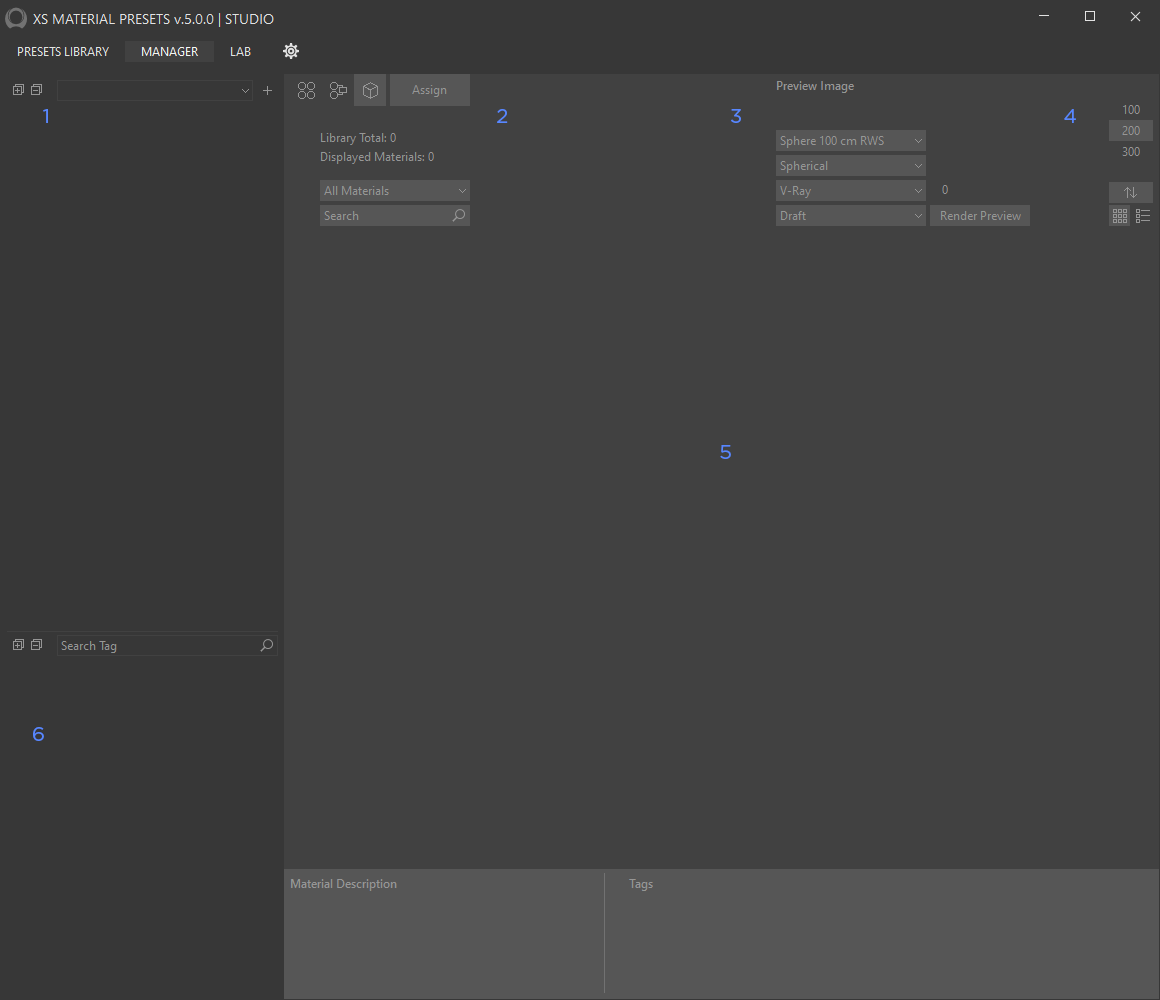
The interface is divided into six main areas, each serving a specific function.

Interface Overview

1. User Library Tree

Displays the structure of user material libraries and their categories.

This area is used to navigate between libraries and organize material collections.

2. Material Tools and Search

Provides controls for sending materials to Autodesk 3ds Max, along with material searching and filtering options.

3. Preview Rendering

Contains controls for rendering material preview images.

4. Gallery Display Tools

Provides options for customizing the Materials Gallery:

  • Gallery display mode

  • Thumbnail size

  • Material sorting order

5. Materials Gallery

Displays the materials contained in the selected library or category.

Two display modes are available:

  • Tiles – Displays materials as thumbnail previews.

  • List – Displays materials in a list.

6. Material Tags Tree

Displays the material tag structure used for organizing and accessing tagged materials.

XSMP Help

  • SETUP AND INSTALLATION
    • Requirements
    • Install Main plugin
    • Install Lab Scenes
    • Install Material Presets
    • Install Texture maps
    • Legacy Upgrade
    • Launching XSMP
    • Activation / Deactivation
  • PRESETS LIBRARY
    • Presets Library UI
    • Presets Library Settings
    • Presets Library Usage
  • MATERIALS MANAGER
    • Manager UI
    • Create New Library
    • Convert Legacy Library
    • Adding Materials
    • Adding Tags
    • Adding Description
    • Generate Preview
    • Manager Settings
  • TEXTURES MANAGER
    • Manager UI
    • New Library and Adding Files
    • Manage Textures
    • Settings
  • MATERIAL LAB
    • Material Lab Scenes
    • Lab Bookmark Manager
  • CHANGELOG
NEWSLETTER SIGNUP

SIGER STUDIO NEWSLETTER

Would you like to keep up with the latest major news and announcements about our products from the comfort of your inbox? Then subscribe to our Newletter – we promise that we don’t send out many of these, so you won’t regret it!
This field is required.

Check your inbox or spam folder now to confirm your subscription.

Siger Studio develops specialized software and digital resources for artists, designers, and visualization professionals. Our focus is on practical functionality, reliability, and attention to detail.

IMPRINT | TERMS AND CONDITIONS | PRIVACY POLICY | CONTACT US

© 2026 Siger Studio. All Rights Reserved.
Customer Area
0

€0.00